HDR Test
See what your browser reports about HDR and wide color, and compare HDR and P3 test patches.
A gradient test fills your screen with smooth ramps of gray and color, so color banding shows up as stripes where the change should be continuous. Reverse flips each ramp, which helps separate banding from marks on the panel.
The ramp should look smooth from black to white; stripes or blocky steps are banding, and the dark end is the usual trouble spot.
Runs entirely in your browser. Test results, audio and video never leave your device.
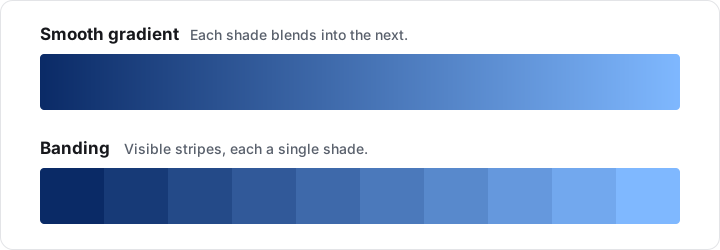
Color banding is visible stripes or steps in an area that should change smoothly, such as a sky, a shadow or a gradient. It happens when a screen, signal or file has too few levels to show the change, or when processing discards some of them. When a gradient breaks into a few wide, flat blocks, it is called posterization.
Banding usually comes from one of these causes, and several can add up on the same screen.
| Cause | What to try |
|---|---|
| 8 bits per color: 256 levels per channel, the depth most browsers use for web pages | Nothing. Faint, evenly spaced steps can be normal at 8 bits and are not a fault |
| Night light, a color profile, or brightness and contrast changed in the graphics driver | Turn them off or reset them, then test again. Adjustments like these can merge levels, especially without dithering |
| Limited-range or YCbCr output from the graphics card | Set the graphics driver to full-range RGB and the display to match. The Contrast Test explains full and limited range |
| A vivid picture mode or raised contrast on the monitor | Try a standard or sRGB mode at the default contrast |
| Video and image compression | Judge banding with gradients drawn live, like these, rather than a video or JPEG |
| The panel, most often in dark shades on some OLED screens and on LCDs with 6 bits per color | Compare with another screen showing this page. Coarse steps that show on only one screen point to that display |
The browser draws each gradient live with CSS, so no image file is scaled or compressed. The ramps run between 8-bit sRGB colors, and most browsers show web pages at 8 bits per channel, so each channel usually has 256 levels: each level of the horizontal gray ramp is about 7.5 pixels wide on a 1920-pixel-wide screen, and each level of the vertical one about 4.2 pixels on a 1080-pixel-tall screen.
Reverse flips a ramp’s direction or, for Radial gray, swaps the white center and the black edge. Nothing is measured or counted.
No. The page cannot tell how many bits reach your panel, and most browsers show web pages at 8 bits per channel, so a 10-bit panel usually shows the same steps here as an 8-bit one. HDR video is encoded at 10 bits or more; the HDR Test helps you check whether HDR is active.
Near black, each level is a bigger relative jump in light than a level in bright tones, and some displays, OLED screens in particular, render their lowest levels less smoothly. That makes the dark end of each ramp the first place to look.
Dithering hides banding rather than removing it. It mixes neighboring levels in a fine pattern, or alternates them from frame to frame, so the steps blend into a smooth ramp. The browser, the graphics driver and the panel can each dither.