Screen Uniformity Test
Fill the screen with white, 50% gray, black, red, green and blue to spot clouding, mura and tint shifts.
Check an LCD monitor, laptop or TV for backlight bleed: light from the backlight leaking around the edges of the screen. In a dark room, press Start test to fill the screen with black, then step through four dark grays.
Pure black. Look for brighter patches along the edges and in the corners.
Keys: ← → color · F full screen · Esc exit
Mark what you saw to get a result you can copy or share.
Runs entirely in your browser. Test results, audio and video never leave your device.
Backlight bleed is light from an LCD's backlight escaping around the edges of the panel, seen as brighter patches or streaks along the edges or in the corners of a dark screen. It usually comes from uneven pressure or small gaps where the panel sits in its frame, so it varies from one unit to the next.
All three show on a dark screen. Moving your head separates IPS glow from the other two, and where the light sits separates bleed from clouding. Black that looks evenly gray across the whole screen is a matter of black level, not bleed; the Contrast Test covers it, and the Screen Uniformity Test goes further into clouding and the dirty screen effect.
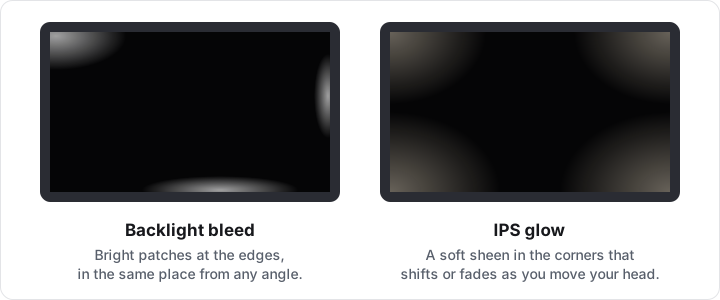
| Effect | What you see | When you move your head | Found on |
|---|---|---|---|
| Backlight bleed | Bright patches or streaks at the edges or corners | Stays in place | Any LCD |
| IPS glow | A silvery or warm sheen in the corners, strongest up close | Shifts, grows or fades | IPS panels |
| Clouding | Uneven lighter blotches across the panel, often clearest on Gray 2% or Gray 5% | Stays in place | Mostly LCDs |
A little light at the edges of a black screen in a dark room is normal on most LCDs. Judge it the way you use the screen: at your usual brightness, with some light in the room, on dark content such as a film or a dark-mode app.
If bleed is visible there, or bright patches reach well into the picture, raise it with the seller while the return window is open. What counts as a defect is up to the seller and the manufacturer. For the rest of the check, see how to test a new monitor.
The makers say much the same. Dell expects some light leakage with dark images in a dark room and inspects screens with 150 lux of room light, 70 lux for gaming monitors. ASUS judges leakage with at least 150 lux and calls leakage on a black screen in a dark room normal. LG says light leaks seen from 40° or more off-center are normal for an LCD. Dell adds that IPS glow is not a defect, while leakage that stays put from every angle can be one if it noticeably spoils the picture.
Sources: Dell: How to distinguish IPS glow and light leakage in a Dell monitor; Dell: Troubleshooting light leakage or bleeding on an LCD monitor or laptop screen; ASUS: LCD screen light leakage judgement; LG: Monitor troubleshooting, light leakage. Checked October 6, 2026.
The page paints the test area with one flat CSS color: Black (#000000), Gray 2% (#050505), Gray 5% (#0d0d0d), Gray 10% (#1a1a1a) and Gray 20% (#333333). The percentages are signal levels out of 255, not light output: Gray 2% gives off well under 1% of white's light, and Gray 20% about 3%.
Start test fills the screen with the Fullscreen API, or with a fixed overlay where the browser has none. After 2.5 seconds without input the control bar and cursor hide, so no interface light sits on the dark field. Nothing is measured; your eyes do the checking.
Yes. A faint glow in the corners of a dark screen is a property of IPS panels, not a fault, and its strength varies from unit to unit. It looks weaker from farther away, with some light in the room or at lower brightness. IPS vs VA vs OLED compares the panel types.
Not by software. Bleed comes from how the panel sits in its frame, so no app or pattern changes it. If it bothers you in everyday use, an exchange within the return window is the safe route.
A phone camera raises its exposure in a dark room, so faint glow turns into bright streaks. Judge with your eyes at your normal viewing distance. If you need a photo for a claim, lower the exposure until the photo matches what you see.
No. OLED pixels make their own light and switch off for black, so there is no backlight to leak. On an OLED screen, the Screen Burn-In Test is the more useful check.
Yes, if the screen is an LCD. Open this page in the phone's or TV's web browser and press Start test, then tap the screen, or in many TV browsers press OK on the remote, to step through the levels.